
Overview in the main window
The Overview pane, card by card: attention, tracking, traffic, suggestions, apps, health and today.
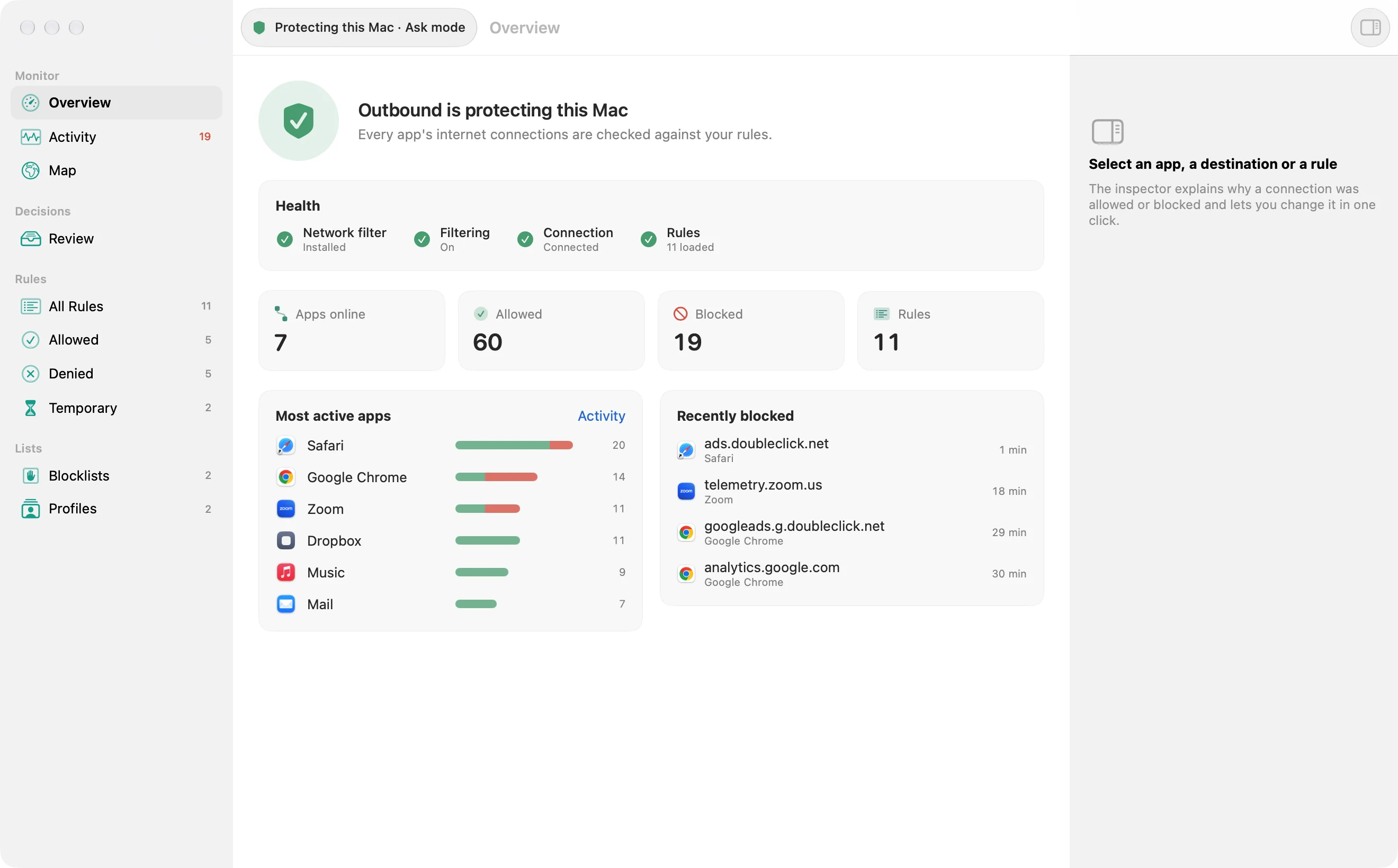
The Overview is the front page: what the firewall is doing, what needs you, and what today looked like. The status pill carries the same state in the toolbar.
The background agent is off
Section titled “The background agent is off”When the background agent has been quit, a card reads “The background agent is off.” and “Alerts and the menu bar item are paused; your rules still apply.” Start Agent brings it back. The header can also say the shorter line “The background agent is off. Your rules still apply.”
Needs your attention
Section titled “Needs your attention”The heading is Needs Your Attention. Each item has its own buttons:
- Apps waiting in Review: “1 app is waiting in Review, some for 2 days” or “3 apps are waiting in Review, some for 2 days”. The detail starts as “Keep what you recognise in Review, then switch to Ask so new connections ask first.” Buttons: Open Review, Switch to Ask, Later.
- An unblock waiting: “An unblock is waiting for your approval”, with the detail “It would allow SUMMARY. Outbound keeps blocking until you decide.” Buttons: Allow… and Keep Blocked.
- A new network: “New network: NAME”. The detail reads “Choose the profile to use here. Outbound knows a network by its router, never by the Wi-Fi name or your location.” Later dismisses it. Use Profile lists your profiles, No Profile and Create Profile…. A checkbox, on at first, reads “Don’t ask again on this network”. See Profiles.
- A health issue shows its own title and detail. A failed action has Dismiss. Other issues show the button for that problem’s way out.

When more issues exist than the card shows, it says “N more in the status menu at the top of the window.”
The header
Section titled “The header”Under the attention card, the header names the protection state. A pause until restart says “Every connection is allowed until this Mac restarts.” A timed pause says “Every connection is allowed until TIME.” While protecting, the line is “Every app’s connections are checked against your rules as they open.” A summary under that names the mode, the rule count (or “rules unreadable”), and the blocklists (“no blocklists”, “1 blocklist”, or “N blocklists”).
Tracking on this Mac
Section titled “Tracking on this Mac”The card is titled Tracking on this Mac. While it checks, it says “Checking this Mac’s connections against known trackers…”. With numbers, See Tracking Report opens the Tracking Report and Block Trackers… deals with what it found. The database is described in Trackers and telemetry.
The traffic tiles
Section titled “The traffic tiles”The counters follow the range set in the Network Monitor. The caption is Live, Last hour, Last 24 hours or Last 7 days. The tiles are Apps online, Connections, Blocked, Sent and Received. Click a tile to open the Network Monitor on what it counts. Blocked opens the monitor filtered to blocked connections. A line under the chart names the peak, “Peak RATE received at TIME” or “Peak RATE sent at TIME”, or “Quiet so far” when there is nothing to plot.
The traffic card
Section titled “The traffic card”The card is titled Traffic, with Sent and Received. Open Monitor opens the Network Monitor. While the first samples are still arriving it says Measuring Traffic and “Traffic appears here after a few seconds of activity.”
With nothing selected, the Summary inspector shows traffic totals, connection counts, and the top apps, domains and countries.

Needs Review and suggestions
Section titled “Needs Review and suggestions”Waiting apps are shown four at a time, each with Allow and Block. The row’s help is “1 connection waiting” or “N connections waiting”. While a decision runs, the button shows its pending label, and the success line is “Allowed NAME.” or “Blocked NAME.” See All appears when more connections are waiting than the card shows.
The heading is Needs Review while any of those apps are listed, and Suggestions when only the tips below remain. If nothing is waiting and there is no tip, the card is left out. Tips are capped at three:
- “1 new connection” or “N new connections”, text “Apps reached new places without asking. Keep or block them.”, button Review.
- In Learn with nothing recorded: “Learn mode is on”, “New connections are allowed and listed. Ask decides as they happen.”, button Use Ask.
- In Learn with apps recorded: “Learn has seen 1 app” or “Learn has seen N apps”, “Keep what Learn recorded as rules (related destinations combined), then switch to Ask so only new kinds of connection alert.”, button Keep and Use Ask.
- With no blocklists: “No blocklists”, “Block known ad, tracker and malware hosts for every app.”, button Add. That opens Blocklists.
- With no location database: “Locations are off”, “Download the free database (60 MB); lookups stay on this Mac.”, button Download.
Top Apps
Section titled “Top Apps”Top Apps ranks apps in the range, with a Sent / Received legend when bytes were measured. See All opens the Network Monitor. The empty line is “Nothing has connected in RANGE.”, using the range’s own words in lower case, such as “1 hour”. Right-click an app for Allow All Connections from APP, Block APP… (when it is not already blocked) and Show in Network Monitor.
Health
Section titled “Health”The card is titled Health. Until a report exists it says Checking…, and View Report waits for one. The check repeats every 120 seconds. The report sheet lists Network filter, Background agent, Protection, Timed out today, Rules and Memory, with Copy Report (it reads Copied after a copy), Check Again and Done. Findings are described in Health checks and issue banners. When Apple Intelligence wrote the summary, the card says “Summarized on this Mac by Apple Intelligence”.
The last card is Today, counted since midnight. With nothing yet it says “No connections yet today.” Otherwise:
- “N apps reached N destinations”, and “ in N countries” when a country is known. One of anything stays singular.
- “N new destinations since midnight”, when there are any.
- “N destinations blocked”. With more than one blocked destination it adds “, most under DOMAIN (N hosts)” or “, including DOMAIN”. This line is a button. Its help is “Show what was blocked”. It opens the Network Monitor filtered to blocked connections.
- “New country for an app: App → Country”, for an app whose first connection was at least three days ago, the first three, then “ and N more”.
- “New today:” and the first three apps that had no saved history before today, then “ and N more”.