
Review and unapproved rules
The queue of connections no rule decided, the rules Outbound marks for a look, and how unblocking is approved.
Review is Outbound’s queue of connections that no rule decided. It collects what Learn allowed, what Strict blocked, what timed out waiting for your answer, and a program whose pinned binary changed. You answer it once, per app and destination, instead of per connection.
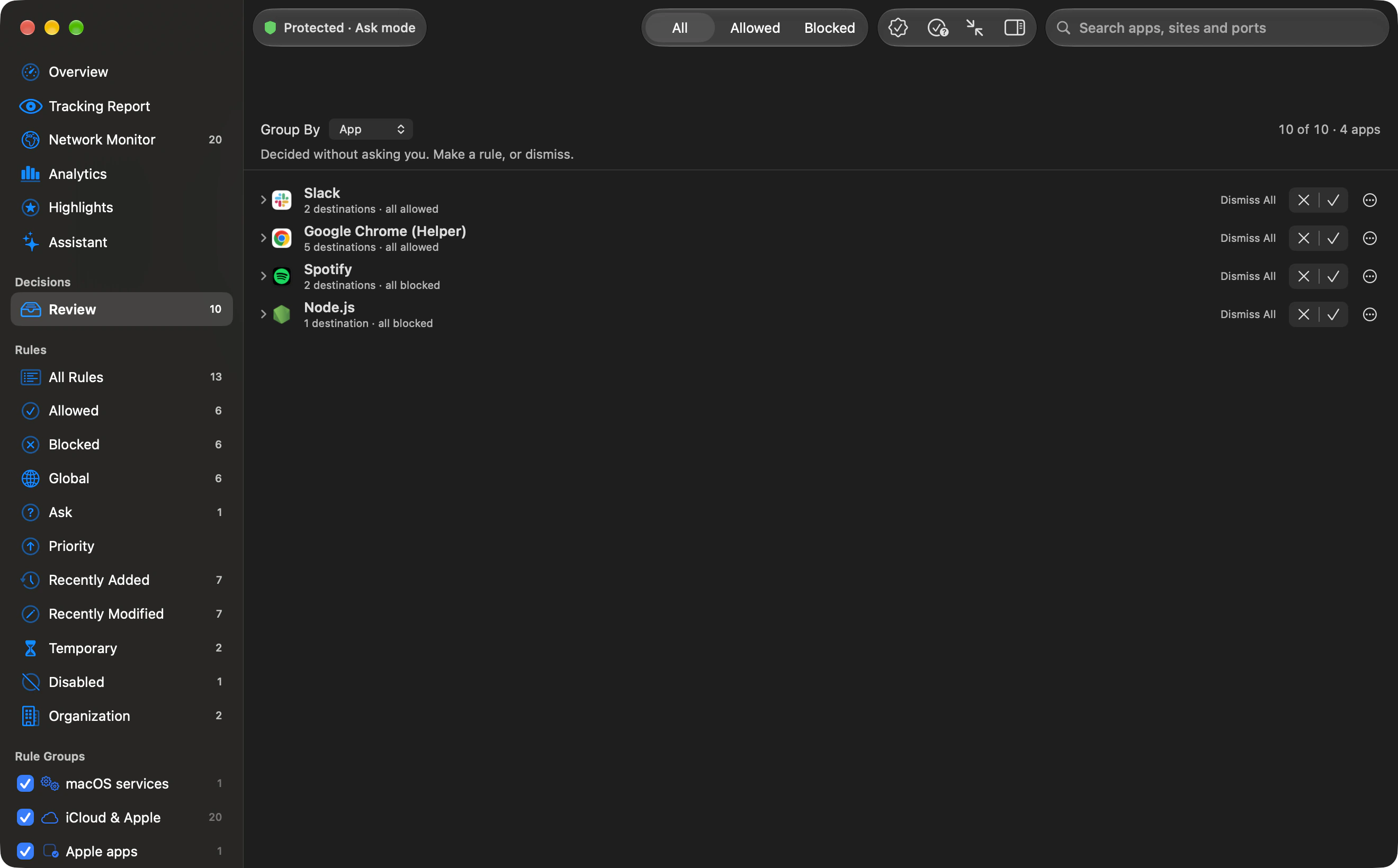
What lands in Review
Section titled “What lands in Review”Each entry is one destination an app contacted without a rule deciding it, however many times it repeated. Four reasons appear:
- Learned: Learn mode allowed the connection.
- Blocked by Strict: Strict mode denied it, with no rule behind the block.
- No answer in time: an alert waited out its timer, and your “If I do not answer” choice was applied.
- Changed binary: a program at a pinned path was replaced, so its old allow or ask rule no longer matched.
Connections a rule decided, and connections you answered in an alert, do not land here. The queue holds at most 5,000 destinations. Past that, the destination unseen longest is dropped (if two were last seen together, the one recorded first goes).
Entries are grouped by app, the app with the newest activity first. Group By in the pane can gather them by domain, host or port instead, or not at all. Every entry remembers the app, the server (the host, or the address when there is no host), the port, the protocol, whether it was incoming, and the count and times of the connections behind it. The list is saved in the app group container as review.json.
Answering
Section titled “Answering”From Review you can Allow or Block for the one destination, or for the whole app (any destination). These become rules that last forever, with the note “Created from Review”, built the same way an alert answer would be. A one-destination rule needs a host or an address. Without one, Review does not invent an anywhere rule.
From a domain or port group you can also make one broader rule for every app: Allow All to (domain) or Block Port (N). A preview lists every waiting connection the rule covers before you save it.
A temporary decision that ended comes back to Review under Temporary decisions that ended, where Make Permanent saves it as a permanent rule and Keep As Is leaves it ended.
When a search or the verdict picker is hiding rows, a bulk action makes one rule per destination that is still shown, so nothing hidden is decided unseen. You can dismiss entries. Undo puts them back.
For the pane itself, including search and the verdict picker, see the Review pane.
Outbound posts at most one “Connections waiting in Review” notification every ten minutes, while that notification kind is on. The body counts the new connections waiting.
Unapproved rules
Section titled “Unapproved rules”Outbound keeps a list of your rules it did not see you approve. A rule is recorded there when:
- A new rule of yours was created in the app while another change was still waiting for approval, or while Mark new rules for review is on (Settings › Advanced), or
- The rules file was written by something else, such as
outboundctlor a hand edit, and it added rules that were not already in memory. Rules already present at launch are not guessed at.
Marked rules are listed under Rules › Unapproved until you look at them. The settings line is “Marked rules are listed under Rules › Unapproved until you look at them, so a rule added by an app, a script or someone else does not go unnoticed.” The mark clears when the rule is deleted, when you approve the held change that contains it, when you later edit the rule in the app with nothing held, or, with Clear the mark when I select a rule on, as soon as you select it. That second switch is available only while marking is on. A tightening made outside the app stays marked until one of those happens.
The marks live in unapproved-rule-ids.json, beside rules.json (see Where Outbound keeps its data).
Approval for changes that unblock
Section titled “Approval for changes that unblock”Settings › General has Ask for Touch ID or your password before broad changes. It is on by default. The line under it:
Allowing or blocking one app’s connection never asks. Broad changes do: allowing any app or any destination, removing a blocklist, choosing a looser mode or pausing. Changes made outside Outbound are held until you approve them. Turning this off also needs approval.
The prompt names what would be allowed. Declining is the button Keep Blocked. There is no grace period: each approval covers the one change it names. One app’s connection to one destination, the ordinary answer to an alert or to one Review row, does not need the password.
A change made outside the app that would unblock something is held. The main window shows “An unblock is waiting for your approval”, with the detail “It would allow … Outbound keeps blocking until you decide.” The buttons are Allow… (help: “Approve with Touch ID or your password”) and Keep Blocked.
If approval cannot run, Outbound says “Touch ID or password approval is unavailable” or “Approval could not be completed”, with the reason after the colon.