Mac firewall guides
An outbound firewall workflow for developers
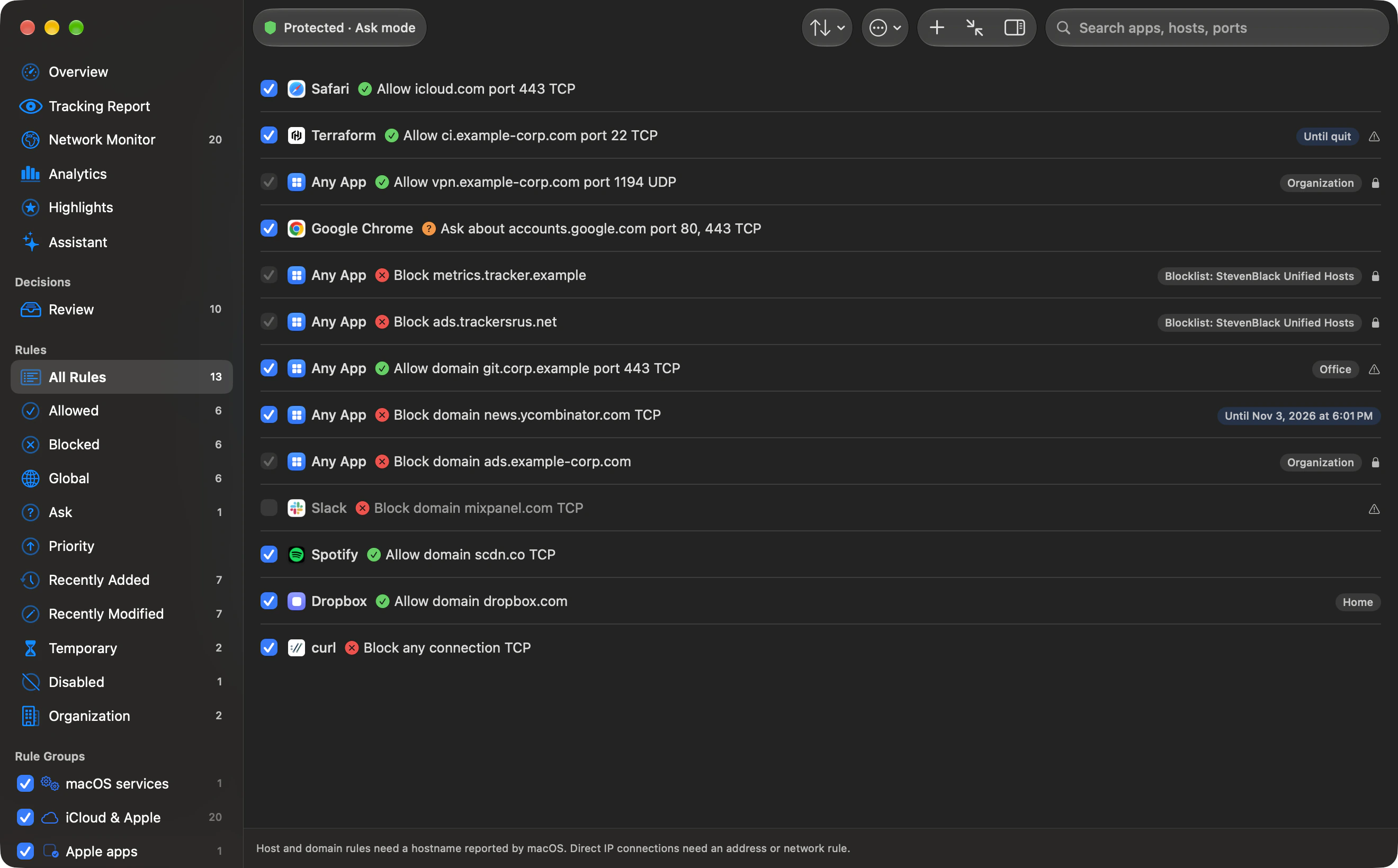
Package managers, test runners and dev servers can share one node or python3 binary. A rule on that exact file covers every program that runs as that file. Scope the rule by host when you want the registry, not every other destination that binary can open.
Updated
Step by step
- Watch one command. Run the install, test or server you care about. In the Network Monitor, search app: and the process name. Read the host and port before you write a rule.
- Name the executable you saw. Outbound matches a signed app by team and signing ID, or an exact file path. A coding agent still shows under its own name, whether it runs from a versioned folder or a bundled Node. A path rule for node does not follow that naming.
- Allow the host that job needs. Point the rule at the registry or git host from the monitor. A domain rule also covers subdomains, so it is wider than one hostname. Use a temporary lifetime until the command succeeds.
- Separate localhost and SSH. A local-network scope is not an allow for the registry. An ssh or git connection gets its own rule for the host the monitor showed. Do not reuse the node rule for both.
- Keep a copy with outboundctl. Export before you import. The outboundctl guide shows the add command; its path and host are examples, so replace both with the binary and host you observed.
Why a rule on node or python3 is broad
Rules match a signed app by team and signing ID, or an exact file path. Wildcard paths are not supported, and an updated binary can need its path or signing identity checked again. A path rule for one node or python3 file applies to every program that runs as that file: a package install, a test runner, a dev server and a script. It does not apply to another version’s path. The FAQ says Claude Code, Codex and the other listed agents show under their own names even from a versioned folder or a bundled Node, so a rule for the agent is not a rule for a shared node binary.
Package managers
npm’s registry documentation says npm uses the public registry at https://registry.npmjs.org by default. Bun’s install documentation says BUN_CONFIG_REGISTRY sets an npm registry and that the default is https://registry.npmjs.org. pnpm’s npmrc page documents registry settings and uses registry.npmjs.org in its examples, including an auth token. A project can point at another registry, so read that project’s setting. Python’s installing-packages tutorial describes installing from PyPI. That page does not give one hostname for every download. Homebrew’s documentation home covers formulae and bottles; watch one brew install in the monitor and scope the hosts that appear. No install was run for this page.
Local servers
A rule can name the local network, separately from a host, domain, address or range. Allowing the local network does not allow registry.npmjs.org. A dev server on the Mac can still open outbound connections, and those show under the process that opened them. Allow or deny those hosts on their own.
SSH and CI tokens
Scope an allow for ssh or git to the host and port in the monitor. Outbound records the destination and how many bytes were sent and received. It does not record the payload, so a CI token on that connection is not something the monitor can show you. pnpm’s npmrc page says pnpm ignores ${...} placeholders in a project .npmrc for registry and credential settings, because expanding them could send secrets such as CI tokens to an attacker-controlled registry during install. Other tools may not have that guard. A wide allow on the node binary lets that process reach whatever host the script names. Prefer the registry host and the git host.
Write the rule from Terminal
outboundctl edits the rule store. The guide’s add example is outboundctl rules add --action deny --remote example.com --path /usr/bin/curl. Use the exact path of the binary you mean, and the host you saw. Import replaces user rules. Export first. Commands were checked against the development CLI when that guide was written; the installed outboundctl --help is the reference for your build.
Outbound instructions are based on Outbound 1.0 and its command-line help. Download Outbound. External product and platform sources are linked beside the relevant guidance.